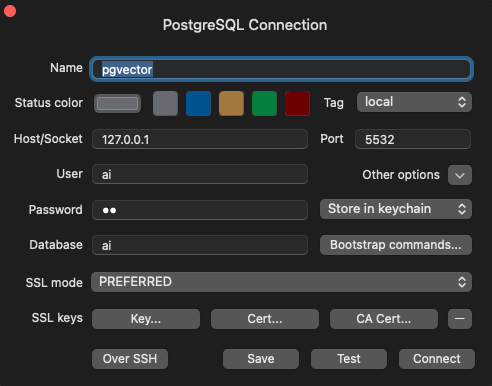
Step 1: Start Your pgvector Container
POSTGRES_DB=aisets the default database name.POSTGRES_USER=aiandPOSTGRES_PASSWORD=aidefine the database credentials.- The container exposes port
5432, mapped to5532on your local machine.
Step 2: Create the Session Table
Agno creates database tables when a database-backed feature first uses them. Run this example to create the defaultagno_sessions table:
create_session.py
1
Set up your virtual environment
2
Install dependencies
3
Export your OpenAI API key
4
Run the example
Save the code as
create_session.py, then run:Step 3: Configure TablePlus
- Launch TablePlus.
- Click the
+icon to add a new connection. - Choose PostgreSQL as the database type.
- Host:
localhost - Port:
5532 - Database:
ai - User:
ai - Password:
ai