> ## Documentation Index
> Fetch the complete documentation index at: https://agno-v2-docs-scavio-google-v2.mintlify.site/llms.txt
> Use this file to discover all available pages before exploring further.
# Database
> Persist sessions and connect Agno features to database-backed storage.
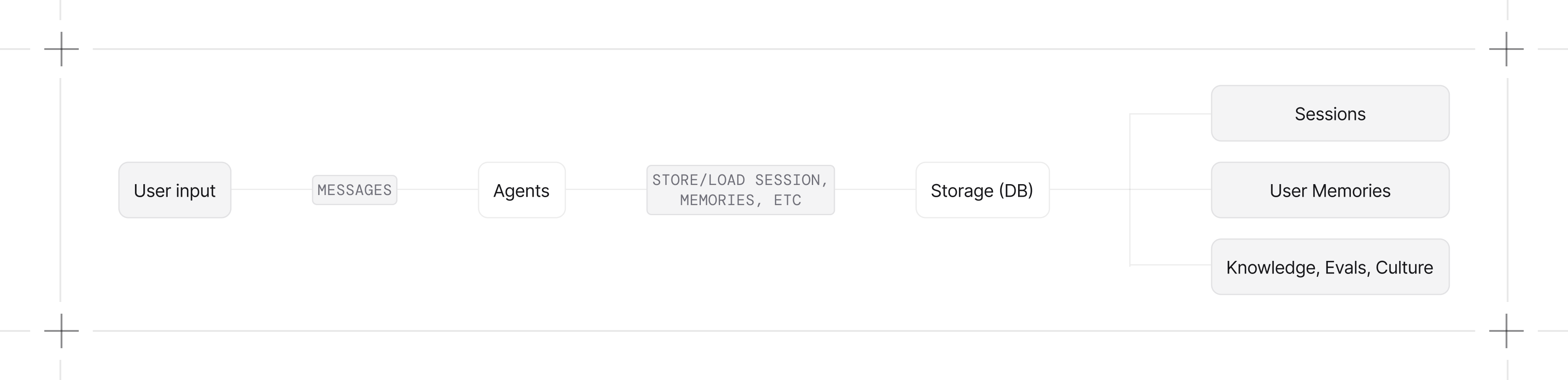
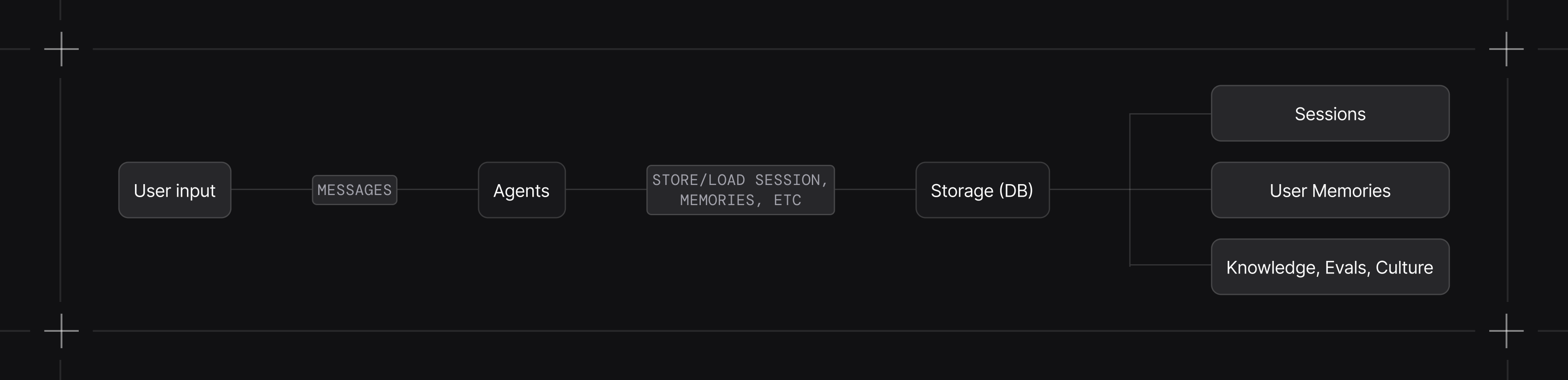
Set `db` on an agent, team, or workflow to persist its sessions and runs. Database implementations can also back memories, learnings, evaluations, knowledge content, traces, and schedules. Supported tables vary by provider.
* **Chat history.** Include previous messages in context for multi-turn conversations.
* **Session persistence.** Store session information and conversation history across requests.
* **State management.** Store session state across runs.
* **Context control.** Store session summaries and the runs used to build model context.
* **Memory and knowledge.** Store user memories, learned knowledge, and knowledge content metadata.
* **Tracing and evaluation.** Store detailed traces for debugging, monitoring, and building evaluation datasets.
* **Data access.** Query records in the database you configure and use them to build evaluation datasets or review run quality.
## Quick Start
```python theme={null}
from agno.agent import Agent
from agno.db.sqlite import SqliteDb
agent = Agent(
db=SqliteDb(db_file="agent.db"),
add_history_to_context=True,
num_history_runs=3,
)
# First message
agent.print_response("I'm working on a Python API project", session_id="dev_session")
# Later, the agent remembers the context
agent.print_response("What testing framework should I use?", session_id="dev_session")
```
The agent now persists sessions and includes the last 3 runs in every request.
 ## Guides
Include previous messages in context for multi-turn conversations.
Store and retrieve session data from your database.
Condense long conversations to manage token costs.
Choose what gets persisted to your database.
## Works With Teams and Workflows
Agents, teams, and workflows all accept the `db` parameter:
```python theme={null}
from agno.team import Team
from agno.workflow import Workflow
from agno.db.postgres import PostgresDb
db = PostgresDb(db_url="postgresql+psycopg://user:pass@localhost:5432/mydb")
team = Team(db=db)
workflow = Workflow(db=db)
```
## Supported Databases
Use SQLite for local development or choose a networked provider for a deployed application. See the [database index](/database/providers/overview).
## Async Support
For async applications, use the async database classes:
```python theme={null}
from agno.agent import Agent
from agno.db.postgres import AsyncPostgresDb
agent = Agent(
db=AsyncPostgresDb(db_url="postgresql+psycopg_async://..."),
)
```
## Troubleshooting
You're using a synchronous engine with an async database class. Use `create_async_engine` from `sqlalchemy.ext.asyncio`.
You're using an async engine with a synchronous database class. Use `create_engine` from `sqlalchemy`.
## Guides
Include previous messages in context for multi-turn conversations.
Store and retrieve session data from your database.
Condense long conversations to manage token costs.
Choose what gets persisted to your database.
## Works With Teams and Workflows
Agents, teams, and workflows all accept the `db` parameter:
```python theme={null}
from agno.team import Team
from agno.workflow import Workflow
from agno.db.postgres import PostgresDb
db = PostgresDb(db_url="postgresql+psycopg://user:pass@localhost:5432/mydb")
team = Team(db=db)
workflow = Workflow(db=db)
```
## Supported Databases
Use SQLite for local development or choose a networked provider for a deployed application. See the [database index](/database/providers/overview).
## Async Support
For async applications, use the async database classes:
```python theme={null}
from agno.agent import Agent
from agno.db.postgres import AsyncPostgresDb
agent = Agent(
db=AsyncPostgresDb(db_url="postgresql+psycopg_async://..."),
)
```
## Troubleshooting
You're using a synchronous engine with an async database class. Use `create_async_engine` from `sqlalchemy.ext.asyncio`.
You're using an async engine with a synchronous database class. Use `create_engine` from `sqlalchemy`.